I sent a simple message to my home agent: turn on the TV and play a video.
I did not want another phone app or cloud account just for a remote control. I wanted the agent to understand my words, then give the real work to a small service on my home network.
That service became webos-mcp. It is an open-source .NET 10 MCP server for LG TVs running webOS.
What it can do
webos-mcp gives an AI agent typed tools instead of raw TV commands. It can:
- turn the TV on and off
- launch apps
- control volume and media
- change inputs and channels
- open a web page
- send remote buttons and text
- play an exact YouTube video
- read power, app, volume, and playback state
- take a screenshot
There are 51 tools by default. A 52nd pairing tool is available only when you enable it.
The server controls one selected TV at a time. You can discover a TV, register it, pair once, and keep the device and pairing key in a local store.
The tested boundary is clear: this project supports LG TVs running webOS. Other brands that use webOS or webOS Hub may work, but I have not tested them.
One TV, four protocols
An LG TV looks like one device, but good control needs four protocols.
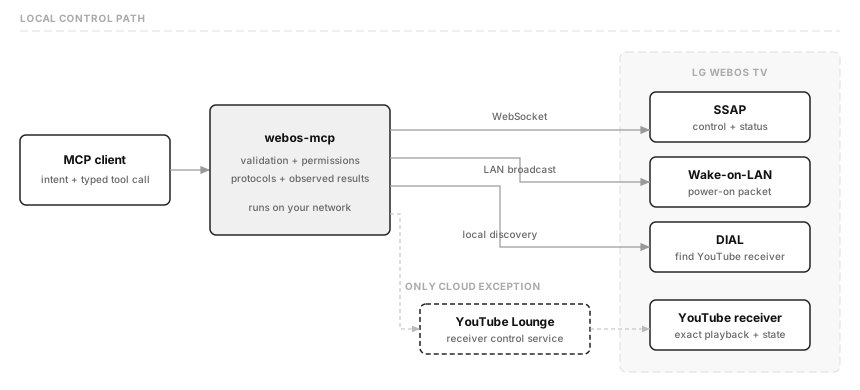
- SSAP controls apps, volume, inputs, status, and remote buttons.
- Wake-on-LAN turns on a sleeping TV.
- DIAL finds the YouTube receiver.
- YouTube Lounge plays an exact video and reads its state.
The first three stay on the local network. YouTube Lounge is the only cloud path.
The agent does not need to know these details. It calls a tool such as tv_power_on or tv_youtube_play. The server handles the protocol, permissions, timeouts, and result checks.
The hidden screenshot API
The most surprising feature is the screenshot tool.
LG does not publish a supported screenshot API for this use case. But one hidden SSAP call returns an image URL. On my TV, it produced a real 960×540 JPEG.
The tool returns that frame as a native MCP image. An agent can show what is on the screen after a direct request. It does not save or log the frame, and it does not run in the background.
There are limits. The call may not work on every model or firmware. Protected video may return a black frame.
The image URL also needs careful handling. The server accepts only HTTP or HTTPS, blocks usernames and passwords in URLs, keeps redirects on the selected TV, and sets strict time and size limits. It then checks the full JPEG or PNG structure before returning anything.
The public screenshot design explains those limits. The real-TV test confirmed a full image without writing the frame or a secret to disk or logs.
Local by default
There is no raw SSAP tool and no hidden service-menu control. Pairing needs a person to accept the prompt on the TV. The client key is never returned or logged.
The HTTP server listens on loopback by default. It can run there without a bearer token. If you bind it beyond loopback, it refuses to start without a token.
You can run webos-mcp with Docker or as a .NET app. The README has the short setup, pairing steps, MCP client configuration, and troubleshooting notes.
If you have an LG webOS TV and an MCP client, enjoy.
Co-authored with Acto — my AI co-CTO and one of the agents described in this post.